
Every minute of downtime costs your organization money. Sometimes a lot of money. Gartner puts the average cost of IT downtime at roughly $5,600 per minute, and that number climbs fast when a major incident hits and your team is still scrambling to figure out who owns the problem.
That’s where incident management software earns its keep.
When something breaks at 2 a.m., you don’t want to be hunting through email threads figuring out who’s on call. You need the right incident management software doing the heavy lifting — routing alerts, notifying the right people, and keeping stakeholders in the loop while your team focuses on actually fixing the problem.
But the market is crowded. You’ve got full ITSM suites, Slack-native tools built for SRE teams, AI-powered alert correlation platforms, and everything in between. Picking the wrong one is expensive, both in licensing costs and in the time it takes to rip and replace.
We’ve done the research. Below, you’ll find detailed breakdowns of 13 of the best incident management software options available today — what they’re good at, who they’re built for, what they cost, and where they fall short.
List of the top 13 incident management software in 2026
| Software | Key Feature | Free Trial | Starting Price |
| SolarWinds Service Desk | ITIL-aligned ITSM with AI-powered routing | Yes (30 days) | $39/technician/month |
| PagerDuty | On-call scheduling + automated escalation | Yes (14 days) | $21/user/month |
| ServiceNow | Enterprise-grade ITSM with deep automation | No (demo only) | Custom pricing |
| Jira Service Management | DevOps-integrated incident workflows (Atlassian) | Yes (free tier up to 3 agents) | ~$20/agent/month |
| Freshservice | User-friendly ITSM with Freddy AI | Yes (14 days) | $19/agent/month |
| incident.io | AI platform for on-call, incident response and status pages | Yes | $15/user/month |
| Rootly | AI-assisted RCA directly inside Slack | Yes (14 days) | $20/user/month |
| BigPanda | AI-driven detection and response | No (demo only) | Contact for pricing |
| Zendesk | Multi-channel incident tracking with AI agents | Yes (14 days) | $29/agent/month |
| SysAid | Agentic AI with full ITSM + asset management | No (demo only) | Custom pricing |
| xMatters | Intelligent multi-channel alert routing and orchestration | Yes | $9/user/month |
| Splunk On-Call | Context-rich incident response for Splunk-native teams | Yes (14 days) | Custom pricing |
| monday service | Flexible, no-code ITSM built on monday Work OS | Yes (14 days) | $31/seat/month |
The 13 Best Incident Management Software, Reviewed
1. SolarWinds Service Desk
©2026 SolarWinds Worldwide, LLC. All rights reserved.
If you want a service desk that covers the full incident lifecycle without making your team go through months of configuration just to get started, SolarWinds Service Desk is worth a serious look.
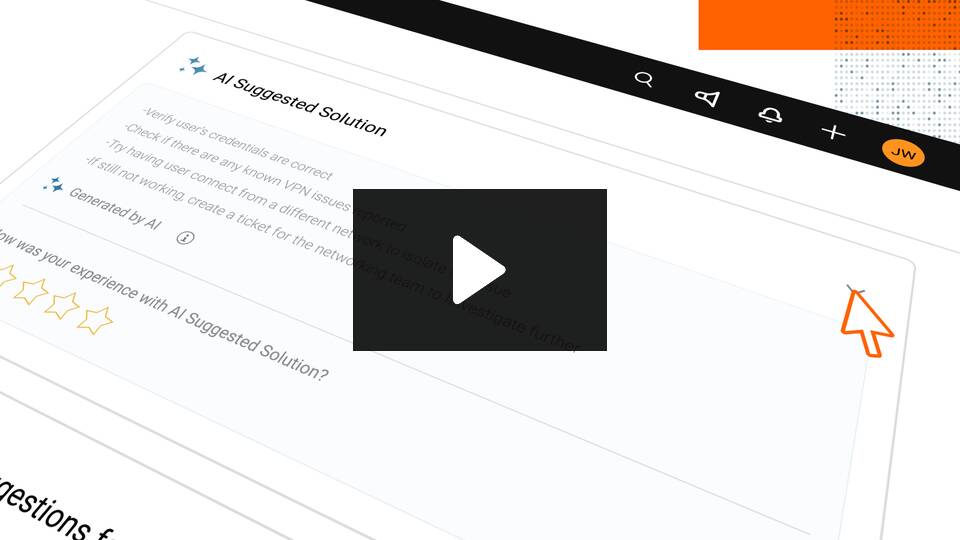
Built on ITIL best practices, Service Desk gives IT teams a centralized place to capture, triage, and resolve incidents — with AI doing the heavy lifting on routing, recommendations, and knowledge article suggestions. When someone submits a ticket, the platform’s AI engine cross-references your knowledge base and past incidents to surface relevant resolution steps automatically. That kind of context, delivered before an agent even opens a ticket, cuts resolution times fast.
The platform also shines when it comes to workflow automation. You can build custom workflows without touching a line of code, automate ticket routing and escalations, and tie incident data directly to your asset inventory through the built-in CMDB. That last piece matters more than people realize: when a server goes down and you can immediately see which services and users it affects, your team makes better decisions faster.
Service Desk integrates natively with the broader SolarWinds ecosystem, so if you’re already using SolarWinds for network monitoring or observability, incidents can flow seamlessly between those tools with the right configuration. That’s a real advantage for ops teams who want a unified view rather than a patchwork of disconnected tools.
SolarWinds Service Desk is Best For:
IT service management teams across mid-size to enterprise organizations, particularly those already in the SolarWinds ecosystem. Also a strong fit for industries such as healthcare, education, and government that need ITIL alignment and audit-trail support.
SolarWinds Service Desk Pricing:
- Essentials: $39/technician/month
- Advanced: $79/technician/month
- Premier: $99/technician/month
Annual billing
SolarWinds Service Desk Limitations:
Some users report that advanced automation options could go deeper, and the highest-tier customization capabilities require the Premier plan. Deep integrations with non-SolarWinds monitoring tools may need API configuration.
Key features of SolarWinds Service Desk:
- AI-powered ticket routing and knowledge base recommendations
- Customizable automated workflows (no-code)
- ITIL-aligned incident, problem, and change management modules
- Self-service portal with virtual agent support
- Real-time dashboards and SLA tracking
- Built-in CMDB and asset management
- Audit trail and compliance reporting
SolarWinds Service Desk Integrations:
- Google SSO,
- Salesforce,
- Zendesk,
- Okta,
- OneLogin,
- Microsoft Teams,
- Slack,
- APIs for custom connections.
SolarWinds Service Desk Deployment:
Cloud-based (SaaS)
2. PagerDuty
© 2026 PagerDuty, Inc. All rights reserved.
PagerDuty is one of the most recognized names in the incident management space, and for good reason. For on-call scheduling, multi-channel notifications, and escalation policies, it’s still one of the most capable platforms on the market.
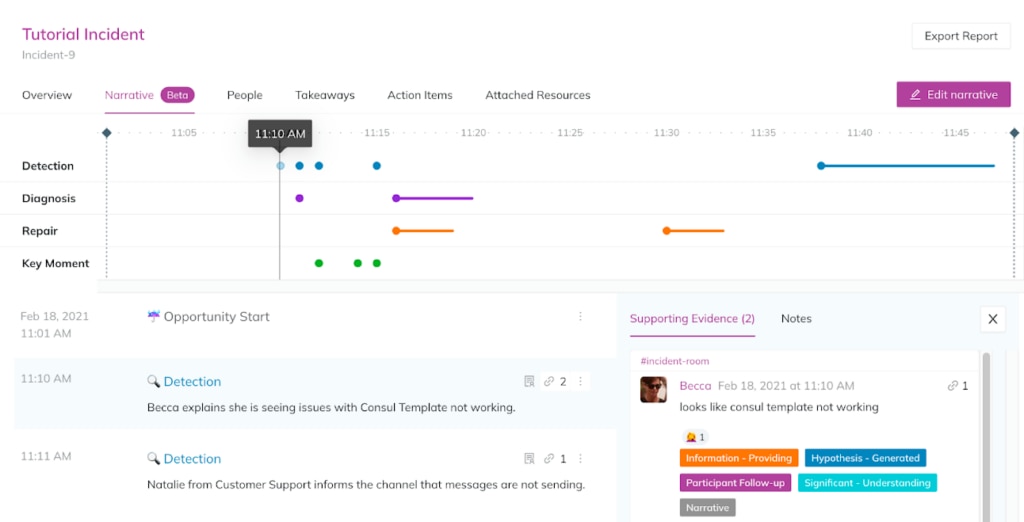
The core value proposition is straightforward: when something breaks, PagerDuty makes sure the right people know about it immediately — via SMS, phone, email, Slack, or Microsoft Teams — and keeps escalating if nobody responds. That sounds simple, but it’s the execution that earns PagerDuty its reputation. The escalation engine is sophisticated, supporting complex multi-level policies, team-based routing, and follow-the-sun scheduling for globally distributed teams.
PagerDuty has invested heavily in AIOps features, with event intelligence that correlates and deduplicates alerts to cut through noise before your on-call engineer even gets paged. On higher tiers, you also get incident workflows with conditionals and loops, post-incident reviews powered by the Jeli acquisition, and bi-directional sync with ServiceNow.
That said, PagerDuty is an expensive tool. For a 50-person team, the licensing costs add up quickly — and essential features like post-incident reviews, advanced incident workflows, and custom incident types are gated behind higher tiers. Teams evaluating PagerDuty should do a careful total cost of ownership analysis before signing.
PagerDuty is Best For:
Large enterprises and SRE teams with complex on-call requirements, distributed global teams, and organizations with existing ITIL workflows. Strong fit for companies already using Slack, Jira, and Datadog as core tools.
PagerDuty Pricing:
- Free: Up to 5 users, limited features
- Professional: ~$21/user/month
- Business: ~$41/user/month
- Enterprise: Custom pricing
PagerDuty Limitations:
High cost at scale, especially with add-ons. Interface can feel complex and cluttered. Configuration of escalation policies requires time and expertise. Critics note the platform can feel dated compared to newer SRE-focused tools.
PagerDuty Key features:
- On-call scheduling with complex rotation types
- Multi-level escalation policies
- AIOps event intelligence and alert deduplication
- Incident workflows with conditionals and loops (Enterprise)
- Post-incident reviews (Jeli-powered)
- Full Slack and Microsoft Teams integration
- Mobile app for iOS and Android
- 750+ integrations
PagerDuty Integrations:
- Slack,
- Microsoft Teams,
- Jira,
- ServiceNow,
- Datadog,
- AWS CloudWatch,
- Splunk,
- Zoom,
- APIs.
PagerDuty Deployment:
Cloud-based (SaaS)
3. ServiceNow
© 2026 ServiceNow. All rights reserved.
When people talk about enterprise ITSM, ServiceNow is usually the first name in the room. It’s the 2024 Gartner Magic Quadrant leader for ITSM, and it’s built to handle the kind of complexity that makes smaller tools buckle — sprawling multi-department workflows, deep CMDB dependencies, regulatory compliance requirements, and high incident volume across large organizations.
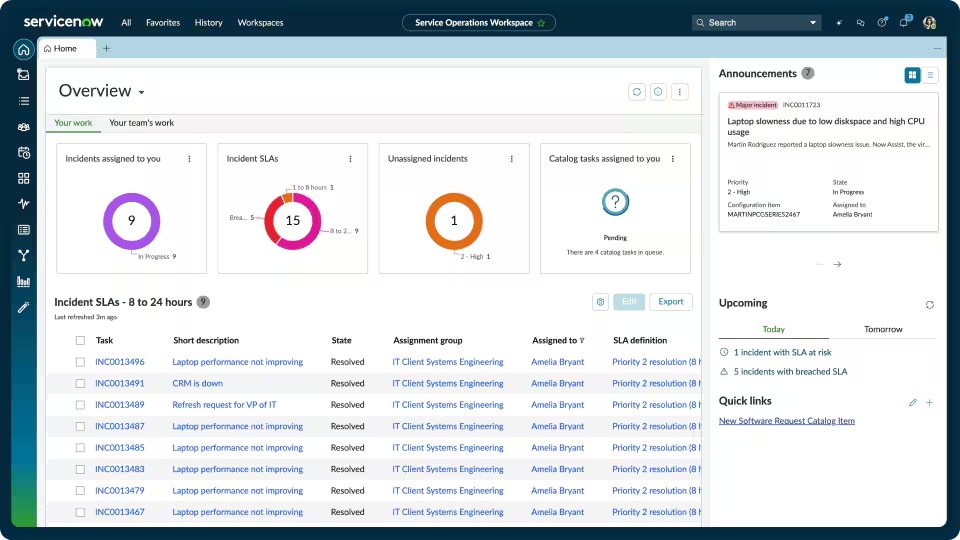
ServiceNow’s incident management capabilities go well beyond ticketing. The platform includes a centralized Service Operations Workspace where agents can handle triage, escalations, approvals, and cross-team coordination without switching tools. Major incident management follows a structured severity assessment process with standardized communication plans baked in. AI-powered features include predictive routing, automated task completion, and anomaly detection that surfaces emerging problems before they become full outages.
The CMDB is one of ServiceNow’s genuine differentiators. When an incident fires, you can immediately see the full map of affected configuration items, service dependencies, and relationships — which means your team makes faster, better-informed decisions about impact and priority.
The honest limitation: ServiceNow is not a quick deploy. Implementation typically requires professional services, and the learning curve is steep. Pricing is custom and tends to be significant, making it harder to justify for organizations that don’t need its full depth.
ServiceNow is Best For:
Large enterprises with mature IT operations, organizations in heavily regulated industries like healthcare and financial services, and teams that need deep ITIL alignment with complex cross-department workflows.
ServiceNow Pricing:
Custom pricing based on users, modules, and deployment scope. Estimated range for enterprise deployments: $50–$100/user/month. Contact ServiceNow sales for a quote.
ServiceNow Limitations:
High implementation cost and complexity. Steep learning curve. Customization often requires developer resources. Can feel over-engineered for mid-size organizations.
ServiceNow Key Features:
- Centralized Service Operations Workspace
- Major incident management with severity frameworks
- AI-powered routing and predictive analytics
- Comprehensive CMDB with dependency mapping
- Automated workflows with no/low-code builder
- Real-time dashboards and metrics
- Mobile app access
- End-to-end audit trail and compliance reporting
ServiceNow Integrations:
- Deep native integrations across enterprise tools: Jira, Slack, Microsoft Teams, Salesforce, Azure DevOps, Splunk, and hundreds more.
ServiceNow Deployment:
Cloud-based (SaaS); private cloud and hybrid options available for enterprise
4. Jira Service Management
Copyright © 2026 Atlassian
If your engineering team lives in Jira, Jira Service Management (JSM) is a natural fit. Built by Atlassian, JSM bridges the gap between the development and IT operations sides of your organization — incidents can link directly to code changes, deployments, and Jira Software issues without anyone manually copying context across tools.
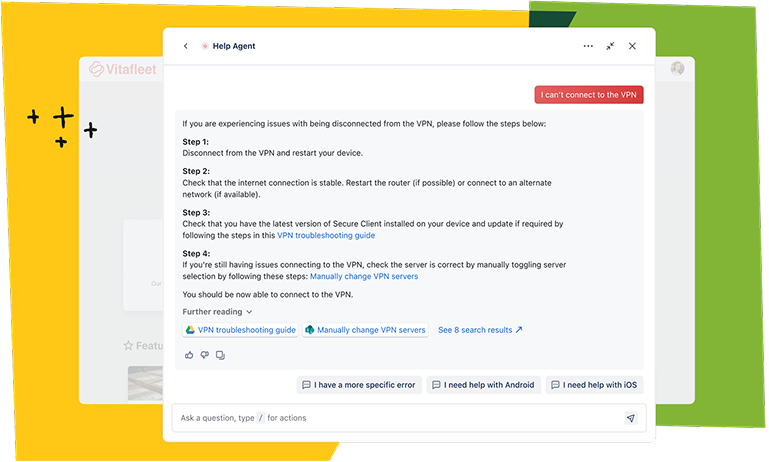
JSM covers the full incident lifecycle with ITIL-aligned workflows, and its recent integration with Atlassian Rovo brings AI capabilities including smart triage, automated routing, AI-drafted ticket responses, and AIOps for proactive incident detection. On-call scheduling and alert routing, previously handled through OpsGenie (which Atlassian is sunsetting in April 2027), are now being folded into JSM’s native capabilities.
The pricing model is one of JSM’s strengths: transparent, per-agent tiers without the “gotcha” add-on fees that competitors often rely on. The free tier for up to 3 agents makes it accessible for small teams getting started, and the Premium tier at $48/agent/month includes change management, asset management, and AI-powered operations.
For teams outside the Atlassian ecosystem, the value proposition weakens. JSM works best when you’re already using Confluence, Jira Software, and Bitbucket — the integrations between those products are tight and genuinely useful. If you’re not, you’re paying for integrations you won’t get full value from.
Jira Service Management is Best For:
DevOps and IT teams already in the Atlassian ecosystem. Mid-size to enterprise organizations that want strong developer-IT collaboration around incidents and changes.
Jira Service Management Pricing:
- Free: Up to 3 agents
- Standard: ~$20/agent/month for 50 agents
- Premium: ~$52/agent/month for 50 agents
- Enterprise: Custom pricing (201+ agents)
Jira Service Management Limitations:
Best value within the Atlassian ecosystem. Higher plans required for advanced features. Some reporting configurations require additional setup. OpsGenie migration creates short-term transition complexity.
Jira Service Management Key features:
- ITIL-aligned incident, problem, and change management
- Native integration with Jira Software and Confluence
- AI-powered triage, routing, and incident summaries (Rovo)
- AIOps for proactive detection and postmortem generation
- 325+ workflow templates
- SLA tracking and customizable dashboards
- On-call scheduling and escalation policies
Jira Service Management Integrations:
- Full Atlassian suite plus 5,000+ third-party tools, including Slack, Microsoft Teams, GitHub, Datadog, PagerDuty, and more.
Jira Service Management Deployment:
Cloud
5. Freshservice
© 2026 Freshworks Inc. All Rights Reserved
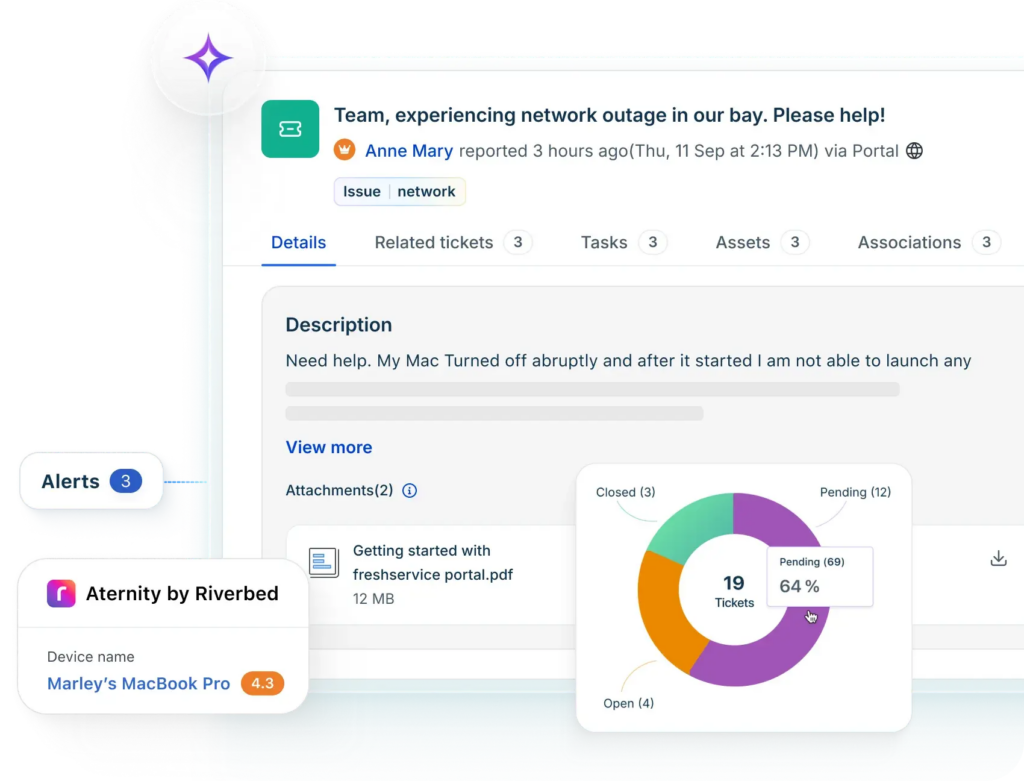
Freshservice hits a sweet spot that a lot of mid-market IT teams are looking for: a full-featured ITSM platform that doesn’t require a six-month implementation or a dedicated admin team to maintain. It’s intuitive enough for teams with limited ITIL experience to get up and running fast, and feature-rich enough to grow with you.
The platform covers incident management, problem management, change management, release management, and asset management out of the box — all ITIL-aligned, PinkVERIFY certified. Freddy AI, Freshservice’s AI layer, handles ticket classification, routing, and resolution suggestions automatically, which means your agents spend less time on triage and more time actually resolving incidents.
Freshservice also handles alert management and on-call scheduling at higher tiers, connecting to your monitoring tools and routing alerts to the right responders. The mobile app is solid, and the multi-channel notification support covers email, SMS, and push notifications so your on-call engineers stay informed regardless of where they are.
The main caveat: advanced features like sandbox environments, IP whitelisting, audit logs, and deeper automation rules are reserved for higher-tier plans. And compared to ServiceNow, Freshservice has less flexibility for highly complex or regulated enterprise environments.
Freshservice is Best For:
Small to mid-market IT teams that want a polished, fast-to-deploy ITSM solution with solid AI capabilities. Great fit for teams moving off spreadsheets or legacy ticketing systems for the first time.
Freshservice Pricing:
- Starter: $19/agent/month
- Growth: ~$49/agent/month
- Pro: ~$99/agent/month
- Enterprise: Custom pricing
Freshservice Limitations:
Advanced features gated to higher tiers. Less customizable than enterprise-grade platforms. Not ideal for highly complex or regulated IT environments at scale.
Freshservice Key features:
- ITIL-aligned incident, problem, change, and release management
- Freddy AI for automated routing and resolution suggestions
- Multi-channel notifications (email, SMS, push)
- On-call scheduling and alert management
- Self-service portal and virtual agent
- Asset discovery and CMDB
- SLA management and real-time dashboards
Freshservice Integrations:
- Slack,
- Microsoft Teams,
- Jira,
- GitHub,
- GitLab,
- Salesforce,
- and the broader Freshworks suite.
Freshservice Deployment:
Cloud-based (SaaS)
6. incident.io
© 2026 Pineapple Technology Ltd. All rights reserved.
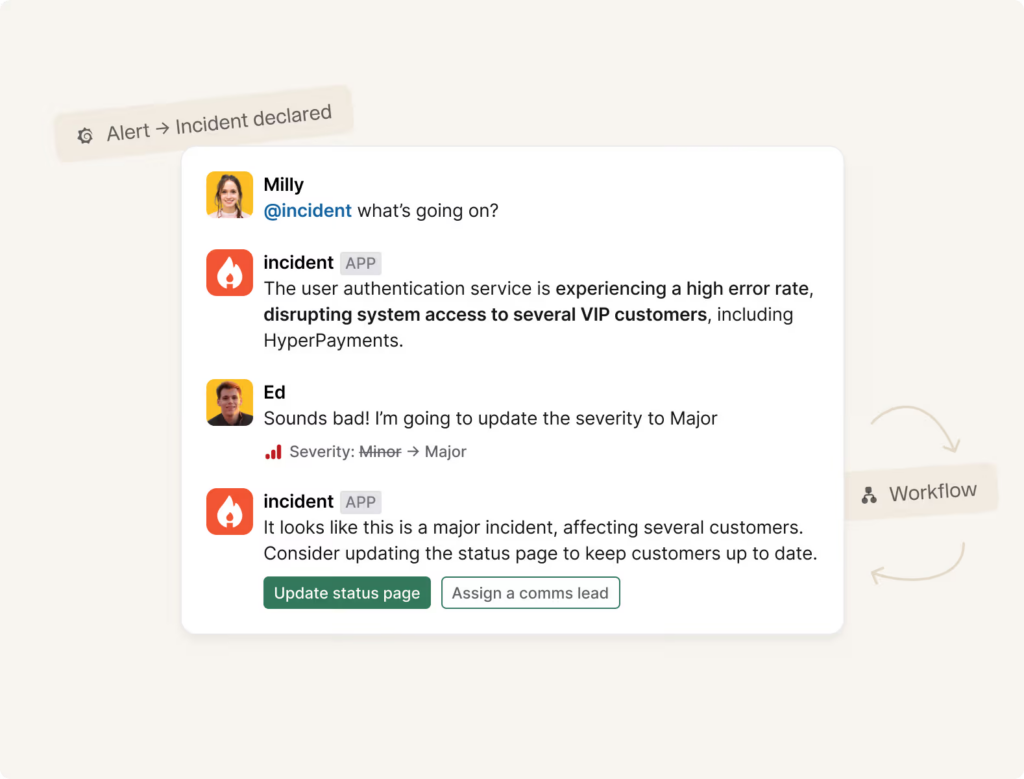
Incident.io is built around a simple premise: incident response happens in Slack, so your incident management tool should too. If your engineering team coordinates incidents in Slack channels today — which most modern teams do — incident.io makes that process dramatically more structured and efficient without forcing anyone to leave the tool they already use.
When an incident is declared in Slack, incident.io automatically spins up a dedicated incident channel, assigns roles, starts a timeline, notifies stakeholders, and kicks off any configured workflows. Status updates go out automatically. Postmortems are generated from the incident timeline with minimal manual effort. On-call add-ons handle scheduling, escalation, and routing for teams that need it.
The platform is polished and genuinely fast in Slack. For customer-facing engineering teams and L1 response scenarios, it’s one of the best tools available. Where it’s lighter is on the deep ITSM and SRE analytics side — teams that need enterprise-grade ITSM alignment, advanced automation rules, or complex reliability metrics will find the platform’s depth limited compared to heavier alternatives.
Incident.io is Best for:
Engineering teams and SRE organizations that coordinate primarily through Slack. Customer-facing incident response where speed of communication matters most.
Incident.io Pricing:
- Free: limited features
- Team: $15/user/month
- Pro: $25/user/month
- Enterprise: Custom pricing
Incident.io Limitations:
Depth is limited for teams needing enterprise ITSM alignment or complex SRE analytics. On-call features are an add-on rather than core. Less useful for teams not primarily using Slack.
Incident.io Key features:
- Slack-native incident declaration, coordination, and timelines
- Automated stakeholder notifications and status pages
- Postmortems generated from incident data
- On-call scheduling, escalation, and routing (add-on)
- Customizable incident workflows and roles
- Integration with existing tooling via APIs
Incident.io Integrations:
- Slack (deep native),
- Jira,
- PagerDuty,
- Datadog,
- GitHub,
- and many more via APIs.
Incident.io Deployment:
Cloud-based (SaaS)
7. Rootly
©Rootly 2026. All rights reserved.
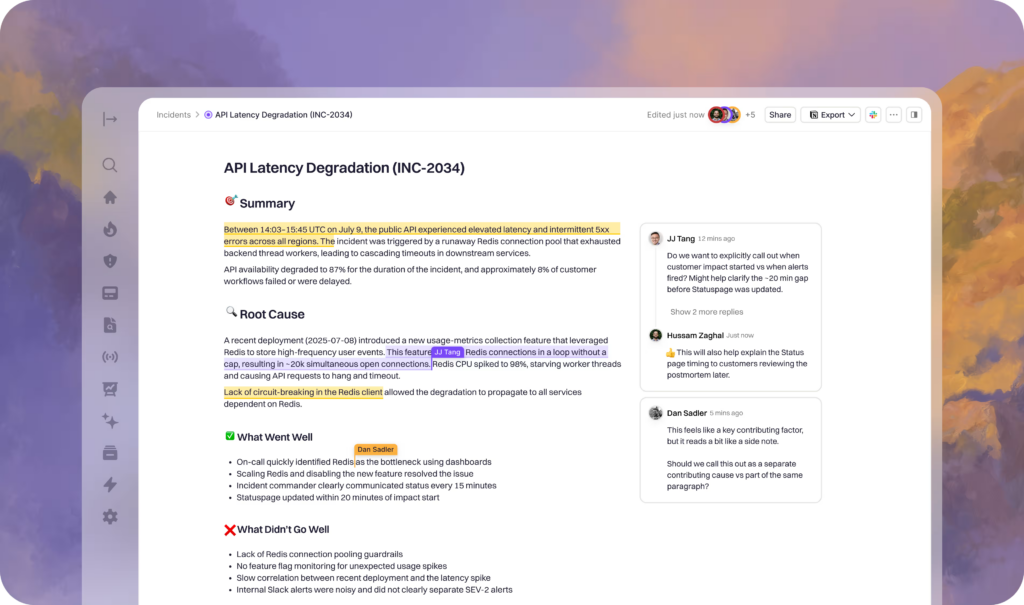
Rootly takes the Slack-native incident management approach and pushes it further with serious AI capabilities. When an incident fires, Rootly’s AI SRE agent automatically cross-references active alerts, recent code changes, and historical incidents to surface probable root causes with confidence scores. That’s the kind of context that usually takes an experienced engineer 20 minutes to assemble manually — and it shows up before most people have even joined the incident channel.
The entire incident lifecycle, from declaration through resolution and postmortem, happens inside Slack. Automated workflows handle the coordination: dedicated channels get created, the right responders are pulled in, timelines are tracked, and post-incident reviews are generated automatically with action items flowing into Jira or GitHub.
Rootly is a strong fit for engineering-led organizations at mid-size to enterprise scale that have already standardized on Slack. Outside of Slack, its usefulness is limited, and pricing scales quickly with team size. Teams not fully committed to a Slack-centric workflow may find the platform’s scope too narrow.
Rootly is Best For:
SRE teams and engineering organizations that want AI-assisted incident management fully embedded in Slack. Mid-size to enterprise scale.
Rootly Pricing:
- Essentials: $20/user/month
- Enterprise: Custom pricing
Rootly Limitations:
Platform is tightly coupled to Slack — limited value for teams that don’t use Slack as their primary coordination tool. Pricing scales up with user count. Less suited for broad ITSM needs beyond incident and on-call management.
Rootly Key Features:
- AI SRE agent for automated root cause analysis with confidence scoring
- Slack-native incident workflows and channel automation
- Automated timelines and postmortem generation
- On-call scheduling with escalation policies
- 70+ native integrations including Jira, GitHub, and PagerDuty
- Customizable playbooks and templates
Rootly Integrations:
- Slack,
- Jira,
- GitHub,
- PagerDuty,
- Datadog,
- ServiceNow,
- and 70+ more.
Rootly Deployment:
Cloud-based (SaaS)
8. BigPanda
©2026 BigPanda. All rights reserved.
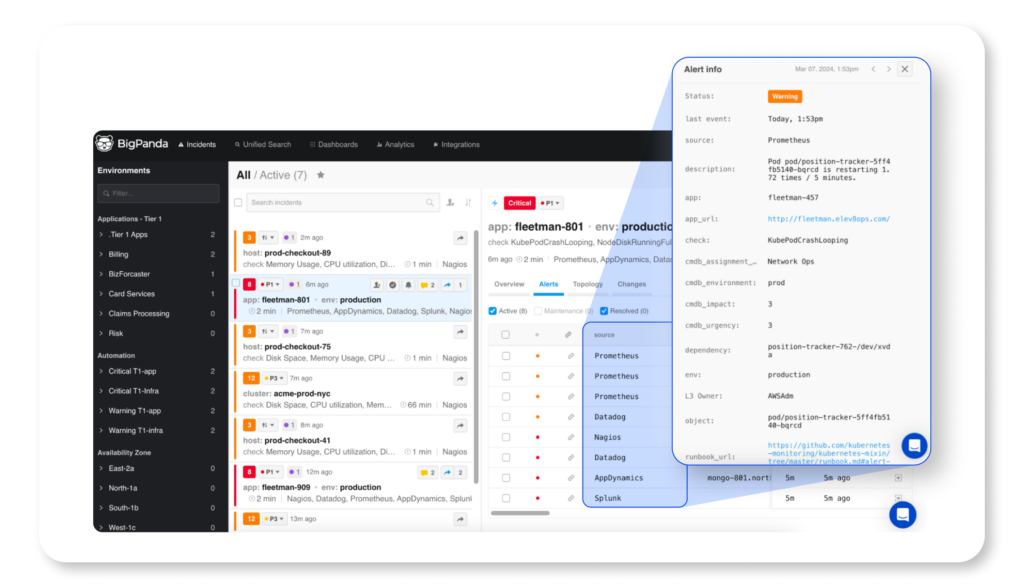
BigPanda solves a specific and painful problem: alert noise. In complex enterprise environments with dozens of monitoring tools firing thousands of alerts per week, most of those alerts are noise. BigPanda’s machine learning engine groups related alerts into actionable “incidents” using AI correlation, which can reduce alert volume by 70% or more according to their published data.
The platform’s AIOps approach is one of the most mature in the market. It learns from historical patterns, service dependencies, and team feedback to improve correlation accuracy over time. The Incident 360 Console gives teams a single-pane-of-glass view of active incidents, and Biggy AI — their generative AI assistant — helps accelerate investigation once an incident is identified.
BigPanda integrates tightly with ServiceNow for ticketing and change management, making it a natural fit for enterprise teams already in that ecosystem. Implementation timelines run 6–10 weeks as the AI engine learns your environment, so this isn’t a fast-deploy tool.
BigPanda is Best For:
Large enterprises with complex IT environments and high alert volumes. Organizations where alert fatigue is a significant operational problem. Teams heavily invested in ServiceNow.
BigPanda Pricing:
- Contact for pricing
BigPanda Limitations:
Significant implementation timeline (6–10 weeks). AI model requires a tuning period before reaching optimal performance. Can be expensive for high alert-volume environments. Complex for smaller teams that don’t need enterprise-scale correlation.
BigPanda Key Features:
- AI-driven alert correlation and deduplication
- Incident 360 Console (single pane of glass)
- Biggy AI generative assistant for incident investigation
- Real-time topology mesh
- Change correlation to link incidents to recent deployments
- Root cause analysis and automated recommendations
BigPanda Integrations:
- ServiceNow,
- Jira,
- Datadog,
- New Relic,
- Splunk,
- AWS CloudWatch,
- AppDynamics,
- PagerDuty,
- Slack,
- and 50+ more.
BigPanda Deployment:
Cloud-based (SaaS)
9. Zendesk
© 2026 Zendesk, Inc.
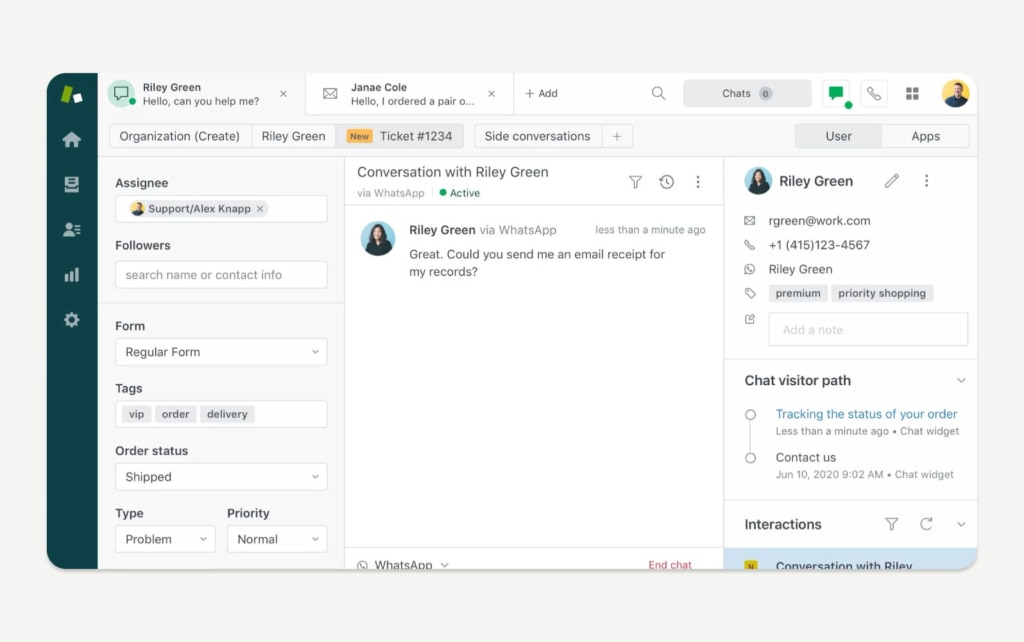
Zendesk is best known as a customer support platform, but its incident management capabilities are genuinely solid — particularly for organizations that want to manage both IT incidents and external customer-facing disruptions in the same system.
The platform’s workflow automation is strong and accessible. Zendesk is designed to get your team up and running without requiring skilled developers to configure it. Automated ticket routing, escalation policies, and SLA tracking work out of the box. Zendesk AI agents are trained on IT ticket data and can handle end-to-end resolution of common incidents through natural language, reducing ticket volume without human involvement.
Multi-channel incident tracking is a standout feature — Zendesk consolidates incidents from email, chat, phone, social media, and integrations with Slack and Microsoft Teams into a single unified queue. For teams that deal with both internal IT incidents and external customer disruptions, that unified view is genuinely useful.
Zendesk is Best For:
Organizations managing both IT incidents and customer-facing service disruptions. Teams that prioritize multi-channel communication and fast deployment over deep ITSM process alignment.
Zendesk Pricing:
- Suite Team: $29/agent/month
- Suite Growth: $59/agent/month
- Suite Professsional: $115/agent/month
- Suite Enterprise: Contact for Pricing
Billed Annually
Zendesk Limitations:
Limited native ITSM depth (no built-in CMDB or change management). More customer-service-oriented than ITIL-aligned. Can become expensive at scale.
Zendesk Key features:
- Multi-channel incident intake (email, chat, phone, Slack, Teams)
- AI agents for automated end-to-end incident resolution
- Policy-based escalation and root cause analysis
- Generative AI for self-service and knowledge base management
- Real-time dashboards and metrics
- Automated workflow builder (no-code)
- SLA tracking and compliance documentation
Zendesk Integrations:
- Slack,
- Microsoft Teams,
- Salesforce,
- Jira,
- and hundreds of third-party tools.
Zendesk Deployment:
Cloud-based (SaaS)
10. SysAid
Copyright © 2026 SysAid. All rights reserved.
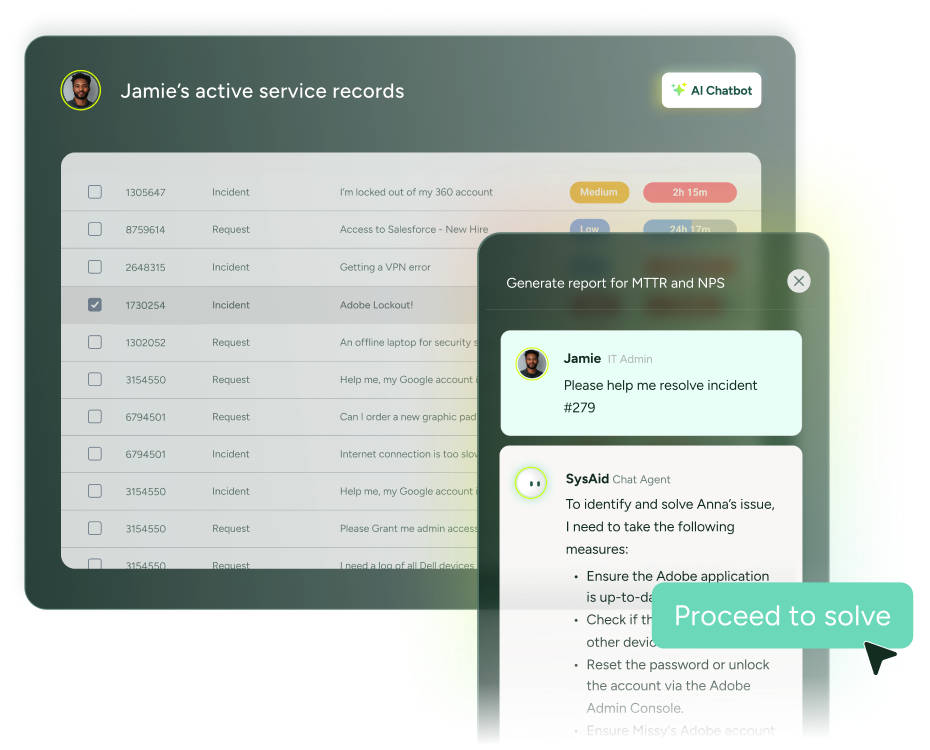
SysAid has been quietly building one of the more impressive AI stories in the ITSM market. Their Agentic AI doesn’t just surface suggestions — it takes action. Resolving duplicate tickets, unlocking user accounts, assigning Microsoft 365 licenses, flagging assets with expiring warranties: SysAid’s AI agents handle these tasks automatically without waiting for human sign-off. The company claims more than 60% of incidents are automatically resolved before they ever become tickets, which, if accurate for your environment, dramatically changes the workload on your service desk.
The platform also comes with a CMDB, full IT asset management, a self-service portal, and a no-code workflow builder — all in one package. SysAid Copilot gives agents real-time ticket context, AI-drafted replies, and a conversational interface for querying incident data during active incidents.
For IT teams in healthcare, education, manufacturing, and financial services — industries where SysAid has a strong installed base — the combination of compliance certifications (ISO 27001, SOC 2 Type 2) and practical ITSM functionality makes it a strong contender.
SysAid is Best For:
Mid-size to large IT departments that need a complete ITSM + asset management platform with advanced AI automation. Strong fit for healthcare, education, and asset-heavy organizations.
SysAid Pricing:
- Contact pricing
SysAid Limitations:
A custom pricing model requires vendor engagement to evaluate costs. Interface can have a learning curve for new users. Some advanced features require higher-tier plans.
SysAid Key Features:
- Agentic AI with autonomous incident resolution
- SysAid Copilot for real-time agent assistance
- No-code workflow builder
- Full IT asset management and CMDB
- ITIL-aligned incident, problem, change management
- Self-service portal and AI chatbot (available via Microsoft Teams)
- Customizable dashboards and reporting
SysAid Integrations:
Microsoft 365, Azure, Jira, Slack, Google Workspace, Okta, Salesforce, Zapier, TeamViewer, and more via APIs.
SysAid Deployment:
Cloud-based (SaaS) and on-premises
11. xMatters
Copyright 2026 xMatters. All rights reserved.
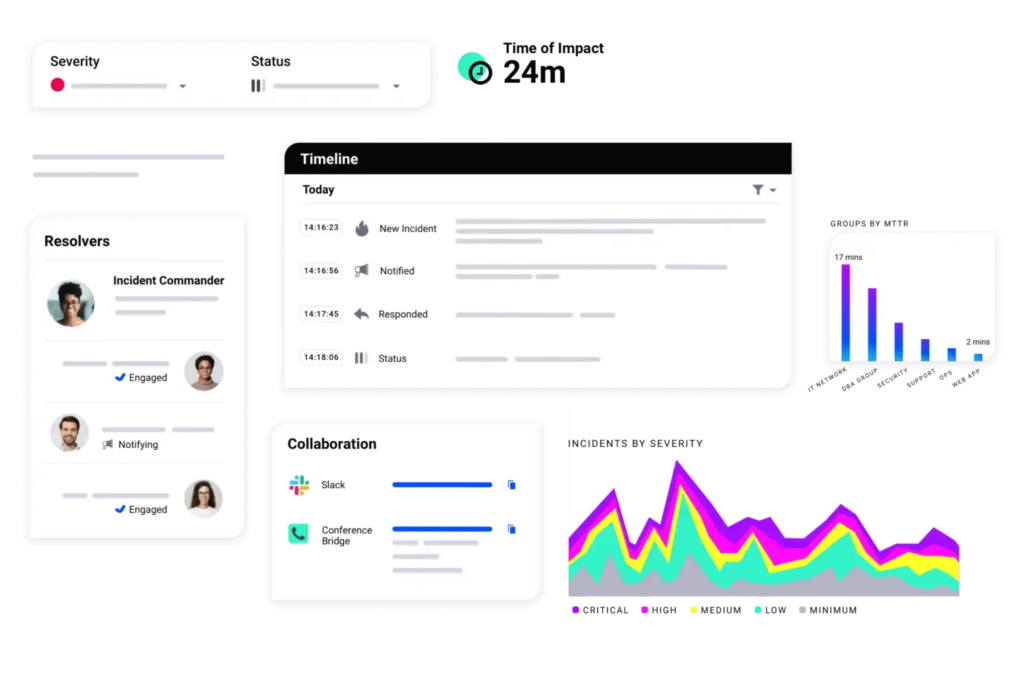
xMatters focuses on one thing more than any other platform on this list: getting the right people notified, through the right channels, with enough context to take action immediately.
The platform’s strength is intelligent multi-channel alert routing. When an incident fires, xMatters evaluates who should be contacted based on on-call schedules, skill sets, availability, and the nature of the incident, then reaches out via phone, SMS, push notification, email, Slack, Microsoft Teams, or whatever channel that person is most likely to respond to. For large enterprises with complex on-call structures and strict escalation requirements, this orchestration capability is hard to beat.
xMatters also carries enterprise compliance certifications including SOC 2, HIPAA, and FedRAMP — making it a practical choice for organizations in regulated industries like healthcare and financial services. The ServiceNow integration is deep and bidirectional, supporting full sync of incidents, changes, and configuration data.
xMatters is Best For:
Large enterprises with complex on-call structures and escalation requirements. Organizations in regulated industries (healthcare, financial services, government) with strict compliance needs.
xMatters Pricing:
- Free: Up to 10 users
- Starter: $9/user/month
- Base: $39/user/month
- Advanced: Custom pricing
xMatters Limitations:
Complexity can be excessive for simpler incident management needs. Setup typically requires professional services. Higher pricing may be prohibitive for smaller teams.
xMatters Key Features:
- Intelligent multi-channel alert routing (phone, SMS, email, Slack, Teams)
- Complex on-call scheduling with “follow the sun” support
- Incident orchestration with automated workflows
- Detailed analytics and response time metrics
- HIPAA, SOC 2, and FedRAMP compliance certifications
- 200+ native integrations via REST APIs
- Status pages for stakeholder communication
xMatters Integrations:
- ServiceNow,
- Splunk,
- Azure DevOps,
- AWS,
- Datadog,
- and 200+ more via APIs.
xMatters Deployment:
Cloud-based (SaaS); supports cloud provider integrations with AWS, Azure, GCP
12. Splunk On-Call
© 2005 – 2026 Splunk LLC All rights reserved.
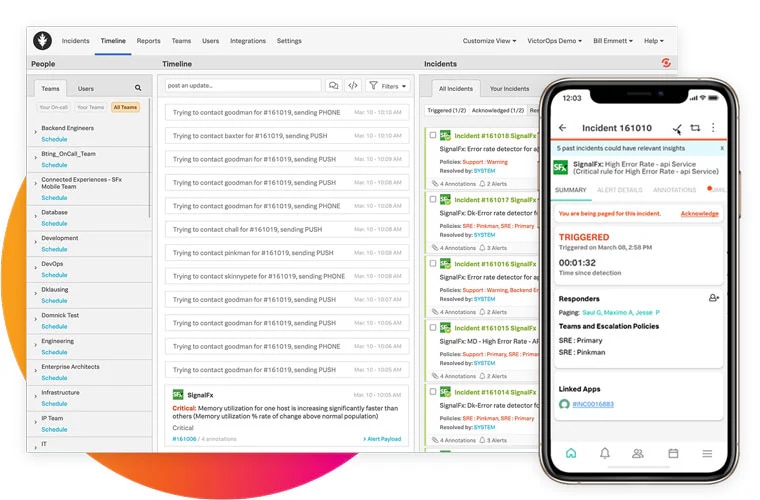
Formerly VictorOps, Splunk On-Call is the incident management platform for teams that have already standardized on Splunk for observability and log analysis. The core differentiator is contextual richness: when an incident fires, the timeline view automatically surfaces relevant Splunk log entries, metrics, and traces alongside the incident alert. You’re not just getting paged — you’re getting paged with the data you need to start investigating immediately.
On-call scheduling, escalation policies, and alert routing are solid and mature. ML-driven recommendations help distribute on-call duties based on expertise and past incident handling, which contributes to more equitable rotations over time. Postmortem and incident review tools give teams a structured way to learn from incidents.
Splunk On-Call is Best For:
Teams already using Splunk for monitoring and observability. Organizations that want deep log context surfaced automatically during incident response.
Splunk On-Call Pricing:
- Custom pricing
Splunk On-Call Limitations:
Maximum value only for Splunk-native environments. Ecosystem dependency can be a lock-in risk. Cisco acquisition introduces roadmap uncertainty for some teams.
Splunk On-Call Key features:
- Timeline view with automated Splunk log and metric correlation
- On-call scheduling with ML-optimized rotations
- Multi-channel notifications and escalation policies
- Alert aggregation and deduplication
- Post-incident review tools
- Historical incident data for pattern analysis
Splunk On-Call Integrations:
- Splunk ecosystem (native),
- Slack,
- Microsoft Teams,
- Jira,
- ServiceNow,
- PagerDuty,
- and common cloud monitoring tools.
Splunk On-Call Deployment:
Cloud-based (SaaS)
13. monday service
All Rights Reserved © monday.com
Monday service is the incident management and ITSM answer for teams that want enterprise-grade functionality without a months-long implementation and a dedicated admin team to run it. Built on the monday Work OS, it brings together ticketing, incident management, SLA tracking, and workflow automation in a visual, no-code environment that non-technical users can actually navigate.
The platform’s AI capabilities handle intake, classification, and routing automatically. AI agents resolve IT requests and support incidents in real time, and the visual workflow builder makes it straightforward to build multi-step incident escalation processes without touching code. The incident board links connected tickets together, categorizes relevant information, and gives your team a clear view of active incidents and their status.
What sets monday service apart from traditional ITSM tools is its cross-departmental flexibility. You can run IT service management, HR service requests, and facilities management from the same workspace. That’s valuable for organizations that want to standardize their service delivery model beyond just IT.
Monday service is Best For:
Organizations that want flexible, no-code ITSM that extends beyond IT to HR, facilities, and operations. Teams that prioritize fast adoption and cross-department visibility over deep ITIL specialization.
Monday service Pricing:
- Standard: €31/seat/month
- Pro: €45/seat/month
- Enterprise: Contact for pricing
Monday service Limitations:
Advanced incident features require Enterprise tier. Less ITSM depth than dedicated platforms for complex enterprise environments. Can be expensive for small teams at higher feature tiers. Primarily internet-dependent (limited offline functionality).
Monday service Key features:
- AI-powered ticket intake, classification, and routing
- Dedicated Incidents board with linked ticket management (Enterprise)
- No-code workflow automation and customizable escalation
- SLA tracking with live timers
- Self-service customer portal and knowledge base
- Cross-departmental service management (IT, HR, facilities)
- Templates for tickets, replies, and incident processes
Monday service Integrations:
- Slack,
- Microsoft Teams,
- Zoom,
- Jira,
- Salesforce, a
- nd hundreds more through native connectors and APIs.
Monday service Deployment:
Cloud-based (SaaS)
How to Choose the Right Incident Management Software
There’s no universal answer here. The best incident management software depends on who you are, how your team works, and what kinds of incidents you’re dealing with.
If you need full ITSM (incident, problem, change, asset management), look at SolarWinds Service Desk, ServiceNow, Freshservice, Jira Service Management, or SysAid. If your primary need is on-call management and escalation for SRE or DevOps teams, PagerDuty, incident.io, or Rootly is a better fit.
Slack-native teams will get the most value from incident.io or Rootly. Teams heavily invested in Atlassian should evaluate Jira Service Management first. Organizations already running Splunk should look hard at Splunk On-Call.
High-volume enterprise environments with alert fatigue should specifically evaluate BigPanda or PagerDuty’s AIOps capabilities.
Healthcare, financial services, and government organizations should prioritize platforms with HIPAA, SOC 2, and FedRAMP certifications — xMatters, SysAid, and ServiceNow all check those boxes.
SolarWinds Service Desk and Freshservice offer strong value at transparent price points. PagerDuty and ServiceNow can get expensive fast at enterprise scale.
What is incident management software?
Incident management software helps IT and engineering teams detect, respond to, and resolve service disruptions in a structured, coordinated way. It centralizes incident tracking, automates workflows, routes alerts to the right people, and provides dashboards and metrics to help teams understand what’s happening and how they’re performing. The goal is to minimize downtime and reduce the impact of disruptions on users and business operations.
Difference between ITSM platforms and dedicated incident response tools
ITSM platforms like ServiceNow, Jira Service Management, and SolarWinds Service Desk provide end-to-end IT service management — covering incident, problem, change, and asset management within a unified system. Dedicated incident response tools like PagerDuty, incident.io, and Rootly prioritize real-time alert routing, on-call scheduling, and rapid response coordination. Many organizations use both: a dedicated tool for detection and active response, connected to an ITSM platform for tracking, reporting, and follow-up.
Core components of an effective incident management process
Effective incident management involves five connected stages: detection and alerting, triage and prioritization, assignment and escalation, resolution and documentation, and post-incident analysis. The best incident management software supports all five, not just detection and alerting.
Detection and alerting
The real challenge is reducing noise, alerts that fire too often lose meaning, and teams start ignoring them. Good alerting is specific and tied to actual business impact, not just raw metrics crossing a threshold.
Triage and prioritization
A clear severity framework (what makes something P1 vs. P2?) and defined ownership (who gets paged, and when do you escalate?) can significantly reduce your mean time to resolution. Ambiguity here is expensive.
Resolution and documentation
Documentation often gets skipped when the team is heads-down fixing things, but a real-time timeline of what was tried and when is invaluable, both for people joining the incident midstream and for the postmortem later.
The post-incident analysis
A blameless review that produces actionable items, not just a document filed away, is what separates teams that improve over time from those that keep fighting the same fires.
The whole process is only as strong as its weakest handoff. Tools that cover detection but leave the rest to Slack threads and tribal knowledge aren’t really incident management, they’re just fancy alerting.
How does AI improve incident management workflows?
AI improves incident management in several ways: correlating and deduplicating alerts to reduce noise, automatically categorizing and routing incidents to the right team, surfacing root causes based on historical patterns and recent changes, drafting postmortems from incident timelines, and predicting SLA breaches before they happen. The best incident management software doesn’t just react — it helps you stay ahead of disruptions.
What’s the difference between incident management and problem management?
Incident management focuses on restoring service as quickly as possible after a disruption. Problem management focuses on finding and eliminating the root causes that generate recurring incidents. The two practices are connected — post-incident reviews feed problem management by identifying patterns that need permanent fixes — but they serve different goals. Full ITSM platforms like ServiceNow, JSM, and SolarWinds Service Desk support both as distinct processes.
What metrics should I track with incident management software?
Key metrics to track include Mean Time to Detect (MTTD), Mean Time to Acknowledge (MTTA), Mean Time to Resolve (MTTR), incident volume by type and severity, SLA compliance rate, repeat incident rate, and on-call load per engineer. Most platforms surface these metrics in built-in dashboards, and tracking trends over time is how you measure whether your incident management process is actually improving.