
Audit management software streamlines the auditing process and facilitates compliance through monitoring, management, and reporting. In this internal audit management software comparison, we’ll look at the best audit software currently available. I’ll look at both closed-source and open-source audit management software, considering versatility, range and sophistication of features, and other factors.
For those who don’t have time to read the full list, SolarWinds® Access Rights Manager is my pick for the best internal audit management software. This tool offers an impressive range of advanced features and doubles as a comprehensive access rights manager.
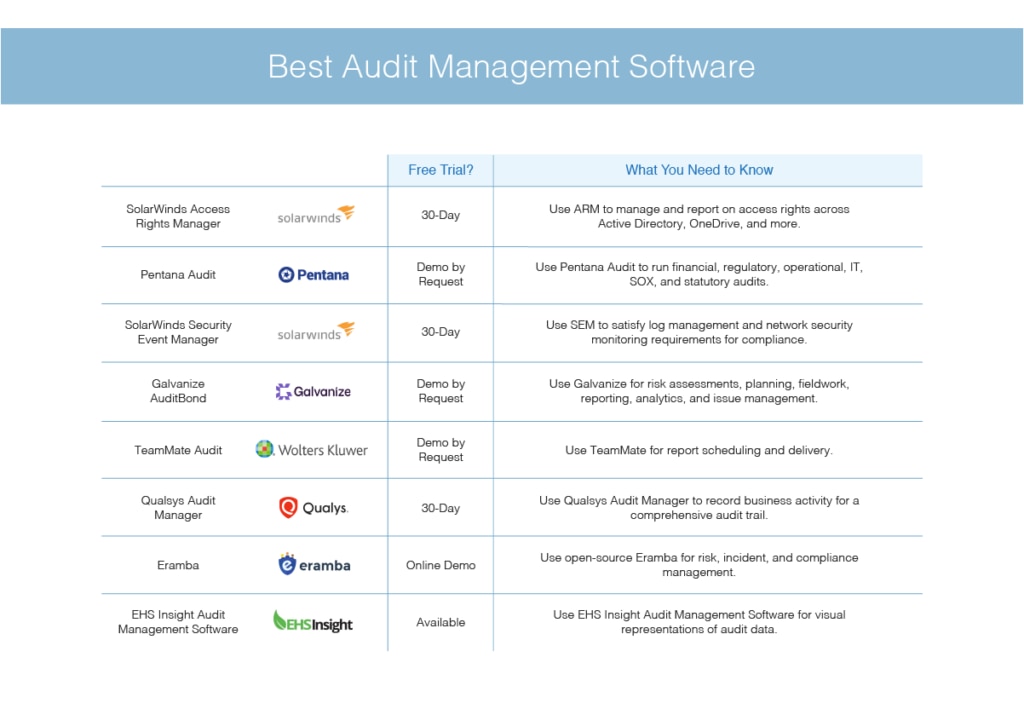
The List: 8 Best Audit Management Solutions
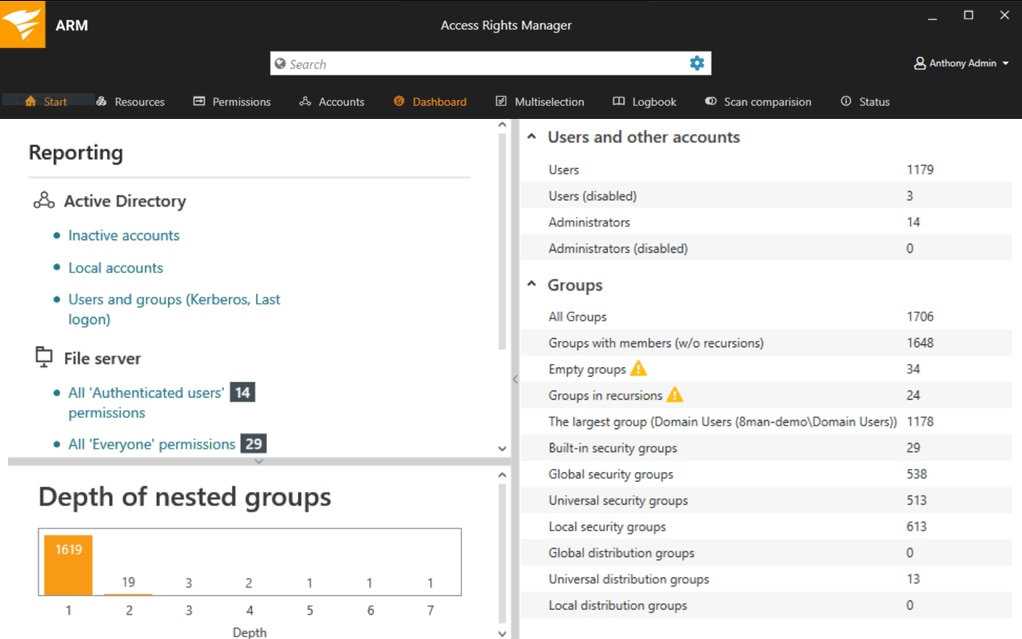
SolarWinds Access Rights Manager (ARM) is a highly versatile audit management solution that lets you manage and audit access rights across your entire IT infrastructure. It’s capable of Active Directory delegation, user account management automation, support for GDPR compliance, OneDrive permissions monitoring, and much more. ARM combines quality management, compliance management, document management, and audit planning to deliver an all-in-one approach to the audit process.
ARM can help you improve risk assessment processes and easily demonstrate industry-specific compliance. If data is being accessed by users from multiple devices and applications, validating compliance status is essential, and ARM simplifies this process by providing you with a unified platform that seamlessly delivers accounting, authorization, and authentication. You can control access to your data, files, and systems from a single window, centralizing all key functionalities. This tool also supports real-time reporting and the creation of audit checklists, so you can verify compliance with major standards.
ARM stands out as my top audit software in part because it automates audit analysis across folders, servers, and files, making the audit process significantly less time-consuming. Proactively identifying and fixing insecure account configurations prior to an audit helps you establish credibility with your auditor. ARM assists in this by giving you visibility into Active Directory account management, access levels, activity, and Azure AD provisioning. This means you have insight into who is accessing specific resources, accompanied by a comprehensive audit trail. Role-specific templates are also available, helping you secure and automate Azure AD and AD user provisioning, as well as the delegation of rights and deprovisioning.
ARM makes Microsoft Exchange Server audit management simple, helping ensure data compliance and security. The reports are detailed, letting you track user activity and account access changes, so you can rapidly identify any security issues. With intelligent alerts, you learn of insecure account configurations in real time. The active incident response feature lets you safeguard confidential business data and standardized audit-ready reports, to help you accelerate security audits.
One of the main reasons ARM tops this list of the best audit management software is it helps you identify insider risks. With a centralized view of IT security policies and account permissions, you can quickly investigate privilege abuses, suspicious activity, and other potential weaknesses in your system.
By combining audit management with access rights management, ARM stands out from the competition. You can save time with automated user access management processes, which let you modify, create, activate, and delete access to services and files. The self-service permissions portal is web-based, so it can be accessed from anywhere, and lets users request access rights directly from resource owners. This saves the administrator from being inundated with permissions requests.
ARM delivers a user-friendly experience alongside a range of highly advanced features. If you’re looking for a tool to streamline, simplify, and accelerate your audit management processes, this software comes highly recommended. A 30-day free trial is available.
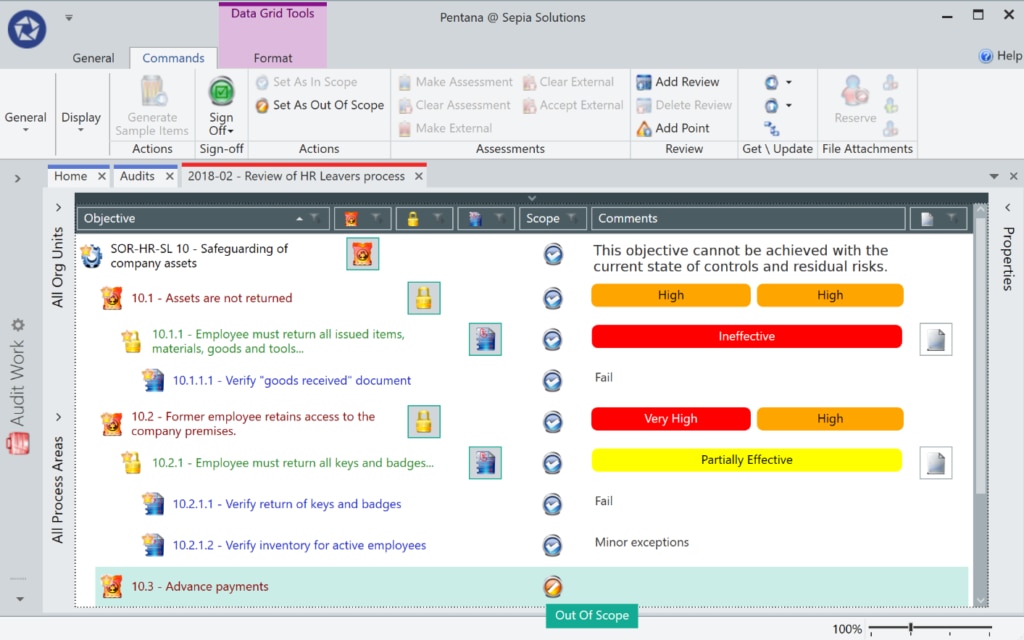
Pentana Audit, once known as MKInsight, is one of the best internal audit management software programs. It helps you conduct quicker and more efficient internal audits, augment your audit strategy, and reduce costs. Pentana Audit supports audit types including financial audits, regulatory audits, operational audits, IT audits, SOX compliance audits, and statutory audits.
This software is especially useful if you want to align your business with the Institute of Internal Auditors (IIA) audit maturity model. Ideagen, the developer behind Pentana Audit, works with the IIA to assist you in becoming a risk-aware, mature organization with the capacity to make informed decisions about future uncertainties. With Ideagen’s step-by-step guide, you can move from the initial stages of audit maturity to the optimized stage, in which continuous audit and monitoring processes are established and supported by dependable data analytics. Pentana Audit brings you in line with this stage by delivering a risk-based, continual monitoring solution.
Pentana Audit takes a highly modern approach to its features, with an emphasis on technological flexibility. The user interface lets you work quickly and efficiently from any location and at any time. You can conduct audits both when you’re online and offline; the tool automatically synchronizes when you’re reconnected, preserving your work.
This tool features flexible APIs, which integrate your processes by connecting data from third-party applications. This flexibility lets you provide users of other systems with key information and simplifies audit management. The living content library is another example of Pentana Audit’s simplifying features. With ready-to-use frameworks, standards, and regulatory content, you can automate your compliance processes for multiple industry-specific regulations.
Pentana Audit also features a library of risks, tests, objectives, and controls, which allows you to define and assess risks and controls automatically. Other features include:
- Time and expense management
- Automated internal and external report generation
- Audit work paper management
- Audit evidence management
- Audit project management
- Data analytics and business intelligence tools
- Issue tracking and action management
- Audit planning
- Audit scoping
- Audit scheduling
Pentana Audit is a versatile audit management tool and can significantly improve and simplify your audit management processes. However, the user interface would benefit from a more intuitive design. You can request a demo here.
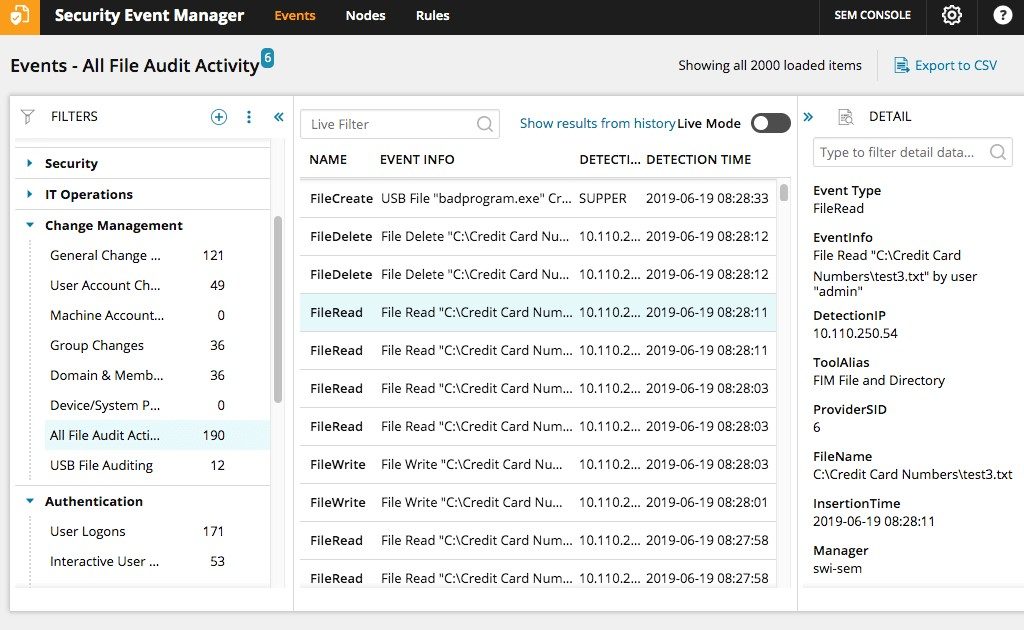
Security Event Manager (SEM) is another SolarWinds product that delivers exceptional compliance management capabilities. To conduct effective auditing, forensic analysis, and reporting, you need robust monitoring and log storage functionalities at your disposal. SEM helps you satisfy log management and network security monitoring requirements enforced by auditing authorities. It gives you access to real-time log analysis, along with the ability to achieve cross-event correlation from sources across your whole infrastructure. This helps you identify attacks, flag threats, and uncover existing policy violations.
SEM provides real-time monitoring and robust audit trails designed to satisfy major IT compliance regulations. The tool collects your user activity logs and proactively monitors them. It also monitors databases, applications, and network elements, enabling you to identify compliance violations quickly and easily.
Certain issues or threats will require immediate action, which is why automated responses are so useful. SEM lets you automate compliance violation responses, which can accelerate your responsiveness and reduce the likelihood of errors. The interface lets you troubleshoot interactively and respond to IT problems directly. Alternatively, you can implement correlation rules to automatically monitor and react to events.
Some professionals prefer to act themselves. SEM gives you the flexibility of choosing to respond to critical events with the active response functionality or, alternatively, to have notifications sent out if you’d prefer to take manual action yourself. Automated actions include blocking an IP address, sending an alert (via email, SNMP trap, or pop-up notification), and resetting a password, in addition to creating, disabling, or removing a user group or account.
SEM lets you generate industry-specific compliance reports for PCI DSS, SOX, GLBA, NERC CIP, and HIPAA, and for internal compliance standards. The integrated reporting functionality makes it easy to generate compliance reports, which include graphical summaries to make proving IT compliance more dynamic. SEM comes with customizable out-of-the-box report templates, so you don’t have to start from scratch.
The SEM user interface is dynamic and easy to use, with data visualization, interactive search, and drag-and-drop utilities. Other compliance management capabilities include:
- Creation of user and system activity logs, so events of interest can be reconstructed
- Multiple event correlation, plus the capacity to create independent activity thresholds per group or event
- Real-time cross-device and cross-event correlation
- Relationship correlation between nominally unrelated events and activities
- High-compression data storage, to facilitate reduced storage space usage and associated costs
- Compliance with data monitoring and retention requirements
- Monitored access to confidential information, creating a chain of custody for log data
This tool can also improve your security, helping you rapidly detect and respond to threats. A 30-day free trial is available for download.
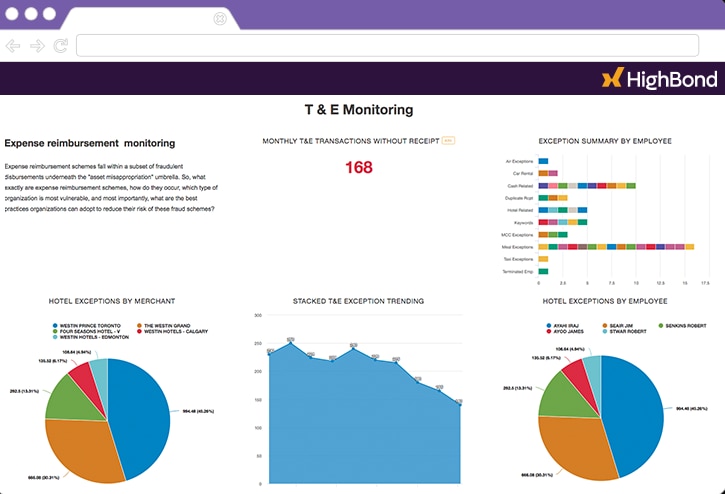
Formerly known as ACL, Galvanize has developed an audit management solution called AuditBond, which assists with all aspects of your audit workflow. This includes risk assessments, planning, fieldwork, reporting, analytics, and issue management. AuditBond is a flexible solution suitable for supporting multiple team transition types. If you’re looking to move away from paper-based and spreadsheet audit methodologies toward agile or integrated risk-driven auditing, then AuditBond is a good option.
This tool is highly scalable and features built-in best practices to support your complete audit workflow. Beyond the ability to create risk-based audit plans, you can manage and schedule audit projects to support your project management strategy. Moreover, to reduce time spent on repetitive tasks, AuditBond maintains a library of previous audits and templates for your workflows.
AuditBond lets you conduct fieldwork even when you’re offline, with mobile applications featuring offline modes. This means you’ll have access to your audit software when you’re in an area with zero connectivity. With built-in reminders and emails, you can send requests to process owners directly.
This tool also features clever issue management capabilities, with real-time visibility across all your audits. Individualized dashboards let you separate audits from each other and centralize your analysis activities. You can drill down into audit results, status, and remediation strategies and consolidate problems found, so remediation plans can be tracked. From a single dashboard, you can schedule reminders, follow-ups, and notifications. When it comes to informing stakeholders of your progress, you can create reports in one click.
AuditBond integrated analytics and robotics features help you modernize your approach to audit management. These include:
- Built-in connectors, allowing you to connect to any data source directly
- Automated monitoring of operational control operations, including SoD, payroll, P2P, AP analysis, SOX, AML, access control, fixed asset management, and general ledger analysis
- Tracking of KPIs and KRIs in real time, automatically integrating them with your dashboards
- R and Python integration for prescriptive analytics and machine learning
- Full analytics audit trail
This tool offers an effective, analytics-driven approach to audit management, although it’s not as user-friendly as some of its competitors. You can request a demo of AuditBond here.
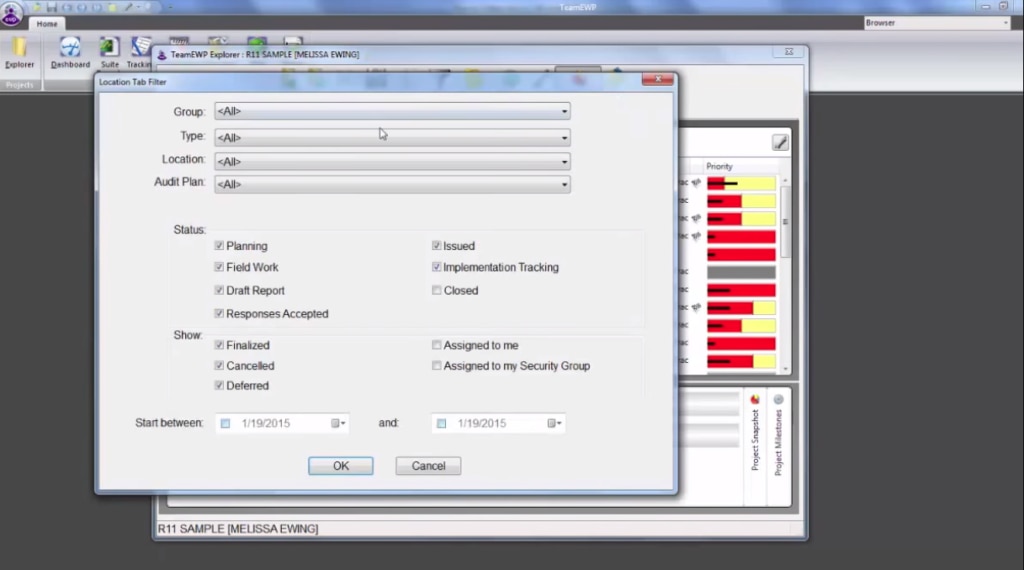
TeamMate audit management software was founded on three core principles: visibility, consistency, and efficiency. To enhance enterprise-wide visibility, TeamMate Audit offers report scheduling and delivery, eliminating the need for manual data collection and report assembly. TeamMate can create a report in a matter of minutes and deliver it to anyone in your organization for review.
To facilitate visibility, TeamMate offers up to 30 different dimensions, affording you multiple ways of viewing your organization. Moreover, it gives you access to TeamStore, a vast knowledge base that promotes consistency by sharing data for risk controls and audit programs. There are more than 20,000 audit procedures and 1,000 best practice controls in the TeamStore content library for you to use, and this library will continue to grow, as all work entered into the tool is automatically added.
Consistency in reports can reduce the likelihood of human error occurring and can increase readability. TeamMate establishes consistency by delivering fully configurable audit reports. With this tool, you can set up departmental standards to ensure reports are generated and formatted consistently.
TeamMate also offers multiple project phase workflow options. Simply select the number of phases for your audit workflow and configure the tool to recognize when each phase has been activated. This lets you perform follow-up audit processes, even when the audit is complete.
With capacity planning, document request management, and audit report workflow capabilities, TeamMate can significantly improve the efficiency of your internal auditing solution. Capacity planning allows your organization to make the most of your team and resources, reducing waste and redundant efforts. Document request management reduces wait times by allowing you to send an electronic request for the information you require. Individuals under audit can then upload documents directly into the system in typically a few seconds.
TeamMate is compatible across numerous browsers and devices, is optimized for any screen size, and maintains a responsive layout. It uses web-based architecture, facilitating rapid deployment. You can request a live demo here.
Qualsys Audit Manager offers simplicity and flexibility, freeing up your time to focus on other priorities. This tool can work offline, allowing you to audit even your most remote locations on any device. Once you’re connected to the internet again, all your work will be synchronized.
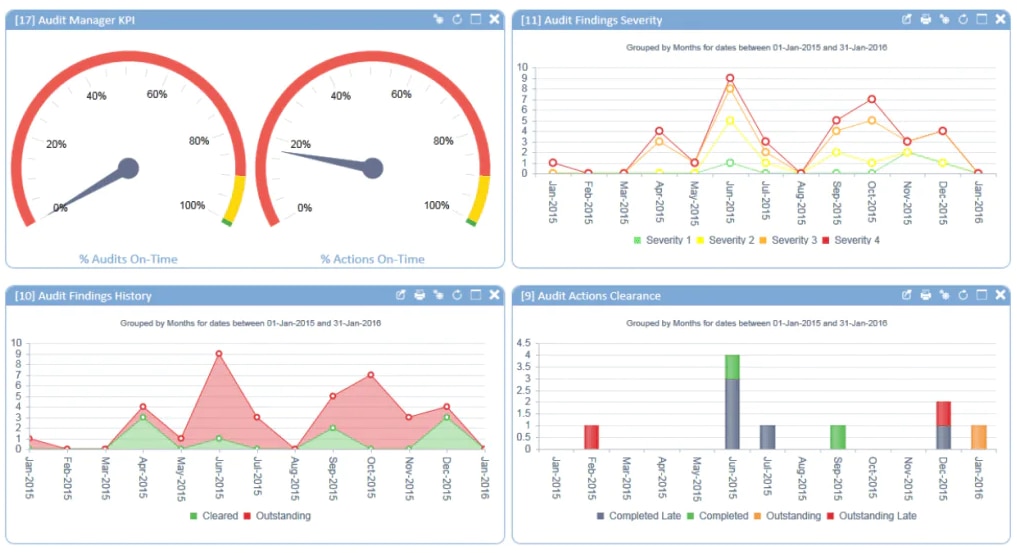
Qualsys Audit Manager records every move and activity to create a comprehensive audit trail. This allows you to demonstrate compliance, if necessary, and enhances traceability. To save you time, Qualsys can generate reports for you. With KPI dashboards, reporting in real time, and data export capabilities, you can interrogate data trends and conduct risk analyses rapidly.
This highly configurable tool enables you to carry out audits, including internal audits, financial audits, and supplier audits, among many others. Along with being versatile, Qualsys Audit Manager is also efficient, with templates that allow you to get started quickly. It helps you make a habit of auditing by enabling you to set up routine audits of systems, policies, and processes.
You can choose your Qualsys Audit Manager plan, view prices, and book a discovery call by visiting this page.
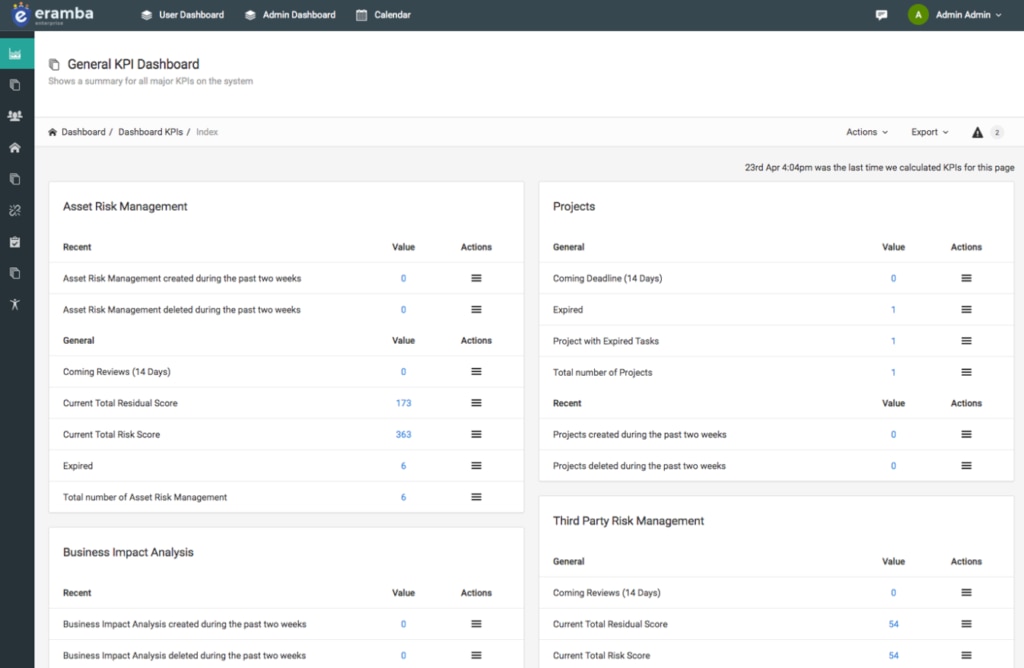
This internal audit management software, open source, is ideal for businesses that value the flexibility of open-source solutions. Eramba is comprehensive, covering risk management, incident management, compliance management, internal control testing, policy reviews, and online assessments. Its features also include notifications, reporting capabilities, filters, and reminders.
Eramba identifies itself as Governance, Risk, and Compliance (GRC) software, but its capabilities also address audit management. It has a lot to offer, including a custom API that lets you create connections between the application and third-party products. This open-source audit management software makes auditing processes faster and simpler, with the ability to execute batch operations and uploads. You can also edit in bulk, significantly reducing time spent conducting internal audit management activities.
Though highly affordable, this open-source audit management software isn’t as sophisticated as its closed source competitors. There are two versions of Eramba available: Community and Enterprise. The Community version is free but limited in its functionality. It’s also only updated on an annual basis, unlike the Enterprise version, which comes with regular updates. The Enterprise version offers technical support as well.
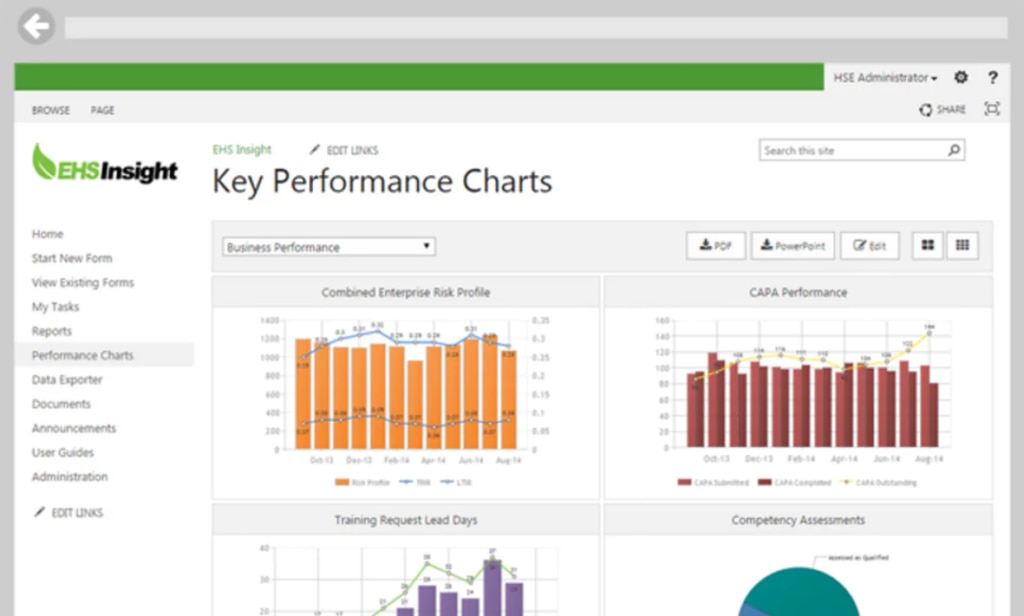
EHS Insight Audit Management Software was designed to save you time, money, and stress. With sophisticated audit and inspection checklists, you can help ensure company-wide compliance with regulatory requirements, with minimal hassle. By automating the audit process, EHS Insight cuts the time spent conducting audits and inspections. It allows you to rapidly generate reports with action items, photos, notes, and other details.
EHS Insight helps you identify areas in need of your attention by providing you with visual representations of audit data. This enables you to make fast and informed decisions about which improvements to prioritize. The tool allows you to work offline from your mobile device and synchronize whenever a connection is available.
With advanced data analysis tools and advice on best practices, EHS Insight is a solid solution for conducting audits. You can access a free trial here.
The Bottom Line: Best of the Best Audit Management Software
SolarWinds Access Rights Manager comes out on top in this internal audit management software comparison. This tool delivers a range of sophisticated features via a simple and easy-to-use interface. Its capabilities for automation are extensive, saving users significant time and resources.
ARM offers maximum visibility, security, and flexibility, and can be scaled to suit companies of any size. As a tool that combines access rights management with audit management, it’s versatile and cost-effective. A 30-day free trial allows you to test it out before committing to the software.
